


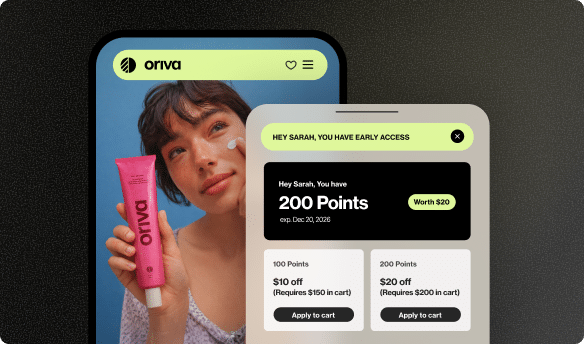






Ever get an email from your favorite store that feels like it was written just for you? Maybe it says, “Hey [Your Name], good news! You have 500 points ready to use!” That amazing feeling of being recognized and knowing exactly what you have? That’s thanks to a clever trick in emails called a “merge tag,” and today we’re going to dive into one of the coolest ones: the “point balance” merge tag. It’s like a secret shortcut that lets emails instantly know how many loyalty points you have, making your shopping experience much more exciting and personal!
What Exactly is a Merge Tag?
Imagine you’re writing a bunch of birthday invitations. Instead of writing “Happy Birthday, Sarah!” on one, then “Happy Birthday, Tom!” on another, and so on, wouldn’t it be great if you could just write “Happy Birthday, [Guest’s Name]” once, and then a magic helper filled in the right name for each friend? That’s pretty much what a merge tag does in emails, but it’s done by computers!
A merge tag is a special placeholder, often looking like words wrapped in curly brackets, like {{customer_name}} or {{order_number}}. These aren’t just random words; they tell the email system to go find a specific piece of information. When an email is getting ready to be sent out, a smart computer program looks at these tags, finds the correct details for each person receiving the email, and then swaps the tag out for the real information. So, {{customer_name}} becomes “Emily” for Emily, and “Michael” for Michael. It’s like a personalized stamp for every single email that goes out!
This trick makes emails feel much more personal and relevant. Instead of a generic message that goes to everyone, it feels like the store is talking directly to you. This is super important because people pay more attention to messages that are relevant and specific to them. It helps businesses connect better with their customers, making their emails much more interesting to open and read. It’s a key part of creating a great customer experience.
Zooming In: The Point Balance Merge Tag
Now that we know what merge tags are, let’s look at our special star: the point balance merge tag. This particular merge tag is designed to show you exactly how many loyalty points you have saved up with a store. Instead of seeing a placeholder like {{customer_points_balance}} in an email draft, when the email arrives in your inbox, you’ll see your actual number of points, like “You have 750 points!” or “Your current balance is 1,200 rewards points.”
Think of it like this: your favorite video game has a score, right? A point balance merge tag is like having that game’s score automatically printed on a message just for you, whenever the store sends you an update about your loyalty program. It’s always up-to-date, showing you your latest score based on your shopping and interactions. This means you don’t have to guess or go searching for your point total.
This is incredibly useful because it gives you a quick, clear update without you having to log into a website or open a special app. It keeps your points top of mind, constantly reminding you of the cool rewards you could be saving up for or redeeming right now. It’s a gentle, helpful nudge that says, “Hey, remember all those awesome points you’ve earned? They’re still here, waiting for you to use them!” It helps you feel connected and aware of the value you’re getting from your loyalty to that store.
Why is Showing Point Balance in Emails Super Important?
You might wonder, why bother with this specific type of merge tag? It’s more than just a nice touch; it’s actually a very powerful tool for stores to keep their customers happy and coming back. By putting your loyalty point balance front and center in emails, businesses can achieve several great things. It creates a stronger bond with customers, encourages them to engage more, and helps them feel truly valued.
Makes Emails Special for Each Person
Imagine getting an email that says, “Dear Valued Customer.” It’s okay, but it doesn’t really grab your attention, right? Now, imagine one that says, “Hello Sarah, great news! You have 500 points waiting for you!” That feels much better! No one likes feeling like just another number in a big crowd. When an email shows your personal point balance, it instantly makes you feel special and seen. It’s proof that the store knows who you are, remembers your activity, and cares about your loyalty. This kind of personalized experience can make a huge difference in how you feel about a brand, making you more likely to open their emails and explore what they offer. It builds a sense of individual recognition that generic messages simply cannot achieve.
Reminds People About Their Points
Life gets super busy, and it’s easy to forget things. You might sign up for a loyalty program, earn some points from a few purchases, and then completely forget about them! Your points might just sit there, unused. A point balance merge tag acts as a friendly, helpful reminder. It prevents your hard-earned points from being forgotten, making sure you don’t miss out on awesome rewards. This helps stores keep their customers engaged and thinking about their next visit or purchase. It’s like a little ping that says, “Psst! Remember those rewards? They’re still here, building up, and could get you something cool!”
Encourages Spending and Redeeming
When you see you have 500 points, your brain might start thinking, “What can I get with that?” Perhaps you’ve been eyeing a new toy or a cool outfit. If you’re close to a big reward, seeing your balance can be just the push you need to make another purchase and reach that goal. For example, if you know you need only 100 more points for a free item, you might decide to make that small purchase you were putting off. Or, if you already have enough points for something, you might be more likely to visit the store, redeem them, and perhaps even buy a few more things while you’re there because you’re already in a shopping mood. It’s a win-win: you get a reward, and the store makes a sale, improving their conversion rate!
Builds Trust and Happiness
Trust is super important in any relationship, including with your favorite stores. When a store clearly shows your point balance in an email, it builds trust. You know exactly where you stand in their loyalty program without having to dig around on their website or wonder if your points are accurate. This openness and clear communication make you feel more comfortable and valued, which naturally leads to greater customer satisfaction. Happy customers feel secure that their loyalty is being recognized and tracked fairly, making them more confident in their shopping choices.
Helps Businesses Grow and Keep Customers
Ultimately, all these benefits lead to stronger relationships between customers and businesses. When customers feel valued, remembered, and excited about their points, they are more likely to return to the store, shop more often, and even share their positive experiences with friends and family. This boosts word-of-mouth marketing and significantly helps businesses improve customer retention. Keeping existing customers happy and engaged is often even more important and less costly than constantly trying to find new ones!
Quick Look: Big Benefits of Point Balance in Emails
| Benefit | What it Means for You | What it Means for the Store |
|---|---|---|
| Personal Touch | Emails feel special and just for you. | Stronger connection with individual customers. |
| Point Reminder | You won’t forget your earned points. | Keeps loyalty program active in customers’ minds. |
| Encourages Action | Motivates you to shop or redeem rewards. | Increases sales and loyalty program engagement. |
| Builds Trust | Clear and honest about your rewards. | Customers feel valued and happy. |
| Customer Growth | You’re more likely to return and recommend. | Better customer retention and new customers through referrals. |
By using point balance merge tags thoughtfully, businesses can really make their loyalty programs shine, creating a positive cycle where customers feel rewarded and businesses thrive.
How Does a Point Balance Merge Tag Work (Behind the Scenes)?
It might seem like magic how your personal point balance just pops up in an email, but there’s a clever system working behind the scenes to make it happen. It’s a bit like a well-choreographed dance between different computer programs. Let’s break down the simple steps:
Step 1: Your Loyalty Program Keeps Track
First, every store that has a loyalty program uses special software to keep track of everyone’s points. Think of it like a digital piggy bank or a personal scorecard for each customer. When you make a purchase, refer a friend, or do something else that earns points, like leaving a product review, this software instantly updates your personal point total. A powerful loyalty solution like Yotpo Loyalty is designed to manage these points flawlessly for businesses, ensuring every point you earn is accounted for.
Step 2: The Email System Connects
Next, the store’s email sending system (the program they use to design and send out all those emails) needs to be able to “talk” to the loyalty program software. These two systems are connected or integrated so they can share information back and forth seamlessly. It’s like two smart friends exchanging notes to make sure they both have the most accurate and up-to-date story about your points.
Step 3: The Magic Moment (Merge!)
When it’s time to send an email that includes your point balance, the email system looks at the email’s template. It sees the {{customer_points_balance}} (or similar) merge tag. This tag is a signal! The email system then quickly asks the loyalty program, “Hey, what’s the current point balance for customer Emily?” The loyalty program responds with the exact, current number for Emily. The email system then instantly replaces the merge tag in Emily’s specific email with that precise number. This happens for every single customer receiving the email.
Step 4: Sending Out the Personalized Email
Finally, once all the merge tags are filled in with the correct, personal information for each customer, the emails are sent out. You receive an email that looks like it was custom-made just for you, showing your very own, up-to-date point balance. This entire process happens incredibly fast, often in milliseconds, so you get accurate, current information every single time you open one of these emails. It truly automates personalization at a large scale.
Where Can You Use This Awesome Merge Tag?
The beauty and versatility of the point balance merge tag is that stores can use it in many different types of emails. Each time it’s used, it makes the email more engaging, more helpful, and more likely to get you to act. Here are some popular places you might see it pop up in your inbox:
- Welcome Emails for New Loyalty Members: When you first join a loyalty program, a welcome email is a perfect place to thank you and immediately show you your starting points or clearly explain how you can start earning them. It sets the tone for a rewarding relationship.
- Point Update Emails: After you make a purchase, leave a review, or earn points in another way, an email can quickly tell you your new, updated balance. This is a great way for stores to show appreciation and keep you in the loop, celebrating your progress.
- Reward Reminders: If you’re close to earning a special reward, an email might say, “Great news! You’re only 100 points away from a $10 discount! Your current balance: 900 points!” This creates excitement and encourages you to take that final step to reach your goal.
- Birthday or Anniversary Emails: Stores often send special emails on your birthday or the anniversary of you joining their loyalty program. Adding bonus points and showing your updated balance can be a delightful and memorable surprise, making you feel extra special.
- Regular Newsletters and Promotions: Even in general newsletters about new products or sales, a small section reminding you of your point balance can keep the loyalty program fresh in your mind and encourage you to check out your rewards.
- Review Request Emails: If a store gives points for leaving reviews, they might include your current balance and mention how many additional points you could earn by sharing your thoughts about a recent purchase. This offers an extra incentive.
- Tier Status Updates: For programs with different loyalty levels (like Silver, Gold, Platinum), emails can include your points, your current tier, and how many points you need to reach the next exciting tier.
Using this merge tag in various communications ensures that customers are always aware of their loyalty status, empowering them to engage more deeply with the brand and its offerings, making every interaction more meaningful.
Making the Most of Your Point Balance Emails
Just including the merge tag isn’t enough; how stores use it makes all the difference in making their loyalty program successful. Businesses can really supercharge their loyalty program by thinking carefully about their emails and how they present the point balance. Here are some smart tips:
- Keep it Simple and Clear: The message around the point balance should always be easy to understand. Don’t use big, confusing words or complicated math. Clearly tell customers what their points are and, most importantly, what they can do with them. Clarity prevents confusion and encourages action.
- Show How to Use Points: Don’t just show the number; tell them the next step! Instead of just “You have 750 points,” add context: “You have 750 points. That’s enough for a free coffee!” or “You’re just a few points away from a 10% discount! Shop now to earn more!” This gives purpose to the points.
- Add Excitement with a Call to Action: Encourage customers to do something specific. Include clear, inviting buttons or links like “Redeem Your Points Now,” “See All Your Rewards,” “Shop Now & Earn More,” or “Check Your Loyalty Status.” These clear calls to action guide them directly to what they need to do to benefit from their points.
- Segment Your Audience: Not all customers are the same, and their point balances will differ greatly. Smart stores send different messages to different groups. For example, a customer with many points might get an email about high-value rewards they can unlock, while someone with fewer points might get a reminder on how to easily earn more. Tailoring messages makes them much more effective.
- Test Your Emails Regularly: Before sending out a big batch of emails, smart businesses always test them. They check if the point balance shows up correctly for different customers, if all the links work, and if the email looks good on different phones and computers. This ensures everyone gets the best experience and avoids any mistakes that could lead to confusion or frustration.
By following these best practices, businesses can turn a simple point balance update into a powerful way to keep customers engaged, motivated, and truly loyal to their brand.
Yotpo Loyalty: Making Point Balance Easy
For businesses, managing a loyalty program and sending personalized emails with accurate point balances might sound like a lot of work. But that’s where powerful tools like Yotpo Loyalty come in! Yotpo Loyalty is designed to be a top-notch loyalty software that makes it simple for stores to create, run, and grow fantastic loyalty programs that genuinely connect with their customers.
With Yotpo Loyalty, stores can easily track every customer’s points, set up exciting rewards, and—most importantly for our topic today—seamlessly integrate point balance merge tags into their email communications. This means the system automatically knows exactly how many points each customer has and ensures that the correct, up-to-the-minute number appears in every email. It takes the guesswork and manual effort out of personalization, allowing businesses to focus on creating great experiences for their shoppers and building deeper connections.
Yotpo Loyalty helps businesses encourage customers to make more purchases, sign up for newsletters, leave helpful reviews (which often earn points!), and even refer friends to the brand (which can earn both the referrer and the new customer more points!). By making it easy to manage and communicate loyalty points effectively, Yotpo Loyalty helps stores build stronger, more lasting relationships with their customers and significantly improves customer retention. It’s about turning one-time buyers into lifelong fans.
Think about how much happier you are when a store clearly shows you your rewards and progress. Yotpo Loyalty helps businesses deliver that clarity, excitement, and value, ensuring that customers always feel appreciated and aware of their progress toward great perks. It helps businesses tell their unique loyalty story and share the rewards with their most engaged shoppers.
Bringing It All Together: Why This Matters for Your Favorite Stores
So, what started as a simple question about a “point balance” merge tag turns out to be a really big deal for how stores talk to their customers and how you experience your favorite brands. These tiny placeholders in emails are incredibly powerful tools that help create a personalized, engaging, and rewarding experience for everyone involved.
For you, the customer, it means less guessing about your loyalty points and more clear, exciting updates about the rewards you’ve earned or are close to earning. It makes you feel like a valued part of your favorite store’s community, rather than just another shopper. It encourages you to explore rewards, take advantage of what you’ve earned, and continue being a loyal customer.
For businesses, using point balance merge tags is a smart, efficient way to keep customers happy, encourage them to shop more often, and build lasting, meaningful relationships. Modern solutions like Yotpo Loyalty make it incredibly easy for stores to manage these programs and send out those personalized, point-packed emails that truly make customers smile and feel appreciated.
Ultimately, these simple tags help bridge the gap between a business and its customers, making communication clearer, more personal, and much more effective. It’s all about making your shopping journey more rewarding, helping you feel recognized, and ensuring you get the most out of your loyalty, one point balance email at a time!





 Join a free demo, personalized to fit your needs